WEB程序开发笔记
WEB程序开发笔记
WEB程序开发笔记
开始前需要做好的准备工作:
- 搭建好 PHP 开发环境(推荐 phpstudy,PHP>=7.2.5,MySql5.7.x)。
- 安装好 ThinkPHP6.0,并做配置可正常连接到 MySql 数据库。
- 安装好 Composer。
使用 Composer 安装数据库迁移工具:
composer require topthink/think-migration
安装成功后,通过php think list查看相关指令: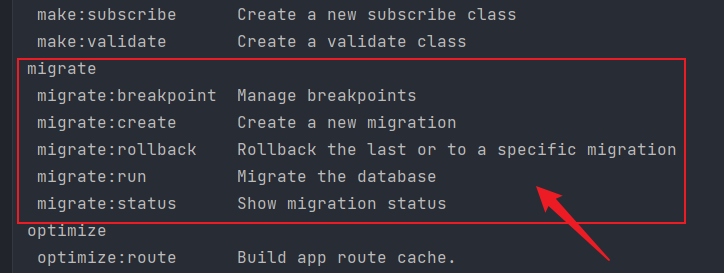
上面截图中红色框线区域为数据库迁移相关指令。我们常用的其中的三个:
下文我以用户表为例进行介绍。
首先通过migrate:create指令生成一个迁移脚本(含基础代码结构的文件)
php think migrate:create User
执行成功的结果如下: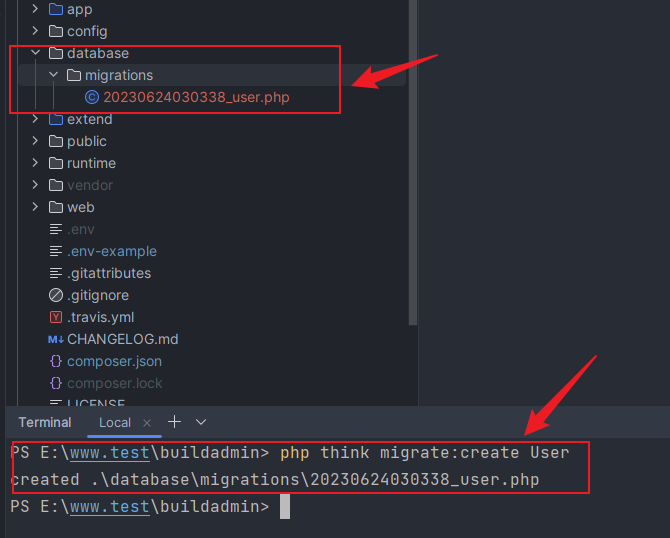
我们可以看到,执行结果是在项目根目录多一个database/migrations目录,来存放迁移脚本文件,文件名格式YYYYMMDDHHMMSS_my_new_migration.php,前 14 个字符就是当前时间戳(精确到秒),后面就是自定义的迁移名称。
修改迁移脚本内容
上文自动创建的迁移脚本文件只是一个框架文件,并没有具体实现。我们可以在这个文件中编码来创建新表、插入数据、增加索引和修改字段等。其中有一个空方法change,我们就在这个方法内进行迁移。
<?php

use think\migration\Migrator;
use think\migration\db\Column;

class User extends Migrator
{
    /**
    * Change Method.
    *
    * Write your reversible migrations using this method.
    *
    * More information on writing migrations is available here:
    * http://docs.phinx.org/en/latest/migrations.html#the-abstractmigration-class
    *
    * The following commands can be used in this method and Phinx will
    * automatically reverse them when rolling back:
    *
    *    createTable
    *    renameTable
    *    addColumn
    *    renameColumn
    *    addIndex
    *    addForeignKey
    *
    * Remember to call "create()" or "update()" and NOT "save()" when working
    * with the Table class.
    */
    public function change()
    {

    }
}
旧版本中
up和down方法,而目前最新版本只需要在change方法中定义up的代码逻辑,不需要定义down方法,因为回滚的时候新版本会自动识别。注意: 当
change方法存在的时候,up和down方法会被自动忽略。如果你确实想用这些方法,你可以创建另外一个迁移文件。
<?php

use think\migration\Migrator;
use think\migration\db\Column;

class User extends Migrator
{
    /**
    * Change Method.
    *
    * Write your reversible migrations using this method.
    *
    * More information on writing migrations is available here:
    * http://docs.phinx.org/en/latest/migrations.html#the-abstractmigration-class
    *
    * The following commands can be used in this method and Phinx will
    * automatically reverse them when rolling back:
    *
    *    createTable
    *    renameTable
    *    addColumn
    *    renameColumn
    *    addIndex
    *    addForeignKey
    *
    * Remember to call "create()" or "update()" and NOT "save()" when working
    * with the Table class.
    */
    public function change()
    {
        $table = $this->table('user', ['engine' => 'MyISAM', 'comment' => '用户表']);
        $table->addColumn('username', 'string', ['limit' => 15, 'default' => '', 'comment' => '用户名,登陆使用'])
            ->addColumn('password', 'string', ['limit' => 32, 'default' => md5('123456'), 'comment' => '用户密码'])
            ->addColumn('login_status', 'boolean', ['limit' => 1, 'default' => 0, 'comment' => '登陆状态'])
            ->addColumn('login_code', 'string', ['limit' => 32, 'default' => 0, 'comment' => '排他性登陆标识'])
            ->addColumn('last_login_ip', 'integer', ['limit' => 11, 'default' => 0, 'comment' => '最后登录IP'])
            ->addColumn('last_login_time', 'datetime', ['default' => 0, 'comment' => '最后登录时间'])
            ->addColumn('is_delete', 'boolean', ['limit' => 1, 'default' => 0, 'comment' => '删除状态,1已删除'])
            ->addIndex(['username'], ['unique' => true])
            ->create();
    }
}
代码解析:
- addColumn() 方法创建字段
- addIndex() 方法创建索引
- create() 方法创建表
- update() 方法更新表
特别注意: 当在change()方法中创建和更新表时,必须使用create()或者update()方法。因为当使用save()方法无法识别是创建还是修改数据表。
Mysql 表支持的选项:
$this->table('表名(不含前缀)', ['选项配置'])id选项会自动创建一个唯一字段。primary_key选项设置哪个字段为主键,默认值为 id。id 将始终覆盖 primary_key 选项,除非它设置为 false。id 设置为 false,且未指定 primary_key,则不会创建主键。primary_key 则不会启用 AUTO_INCREMENT 选项。id选项的值设置为新主键名称即可。$table->addColumn('列名称', '列类型', ['选项配置'])$table->addIndex(['列1', '列2', '...'], ['选项配置'])执行迁移就是执行上文在change方法中定义的逻辑,执行成功就会在数据库创建或更改相关数据表。
php think migrate:run
--target(简写:-t)选项来运行指定版本号的迁移脚本php think migrate:run -t 20230624030338
--date(简写:-d)选项来运行指定日期的迁移脚本php think migrate:run -d 20230624
选项-d的值实际经测试支持年(2023)和年月(202306),上例中年月日(20230624)运行无效果。
回滚命令用于撤消 Phinx 以前执行的迁移。
php think migrate:rollback
--target(简写:-t)选项来回滚指定版本号的迁移php think migrate:rollback -t 20230624030338
注意
- 实际测试发现选项
-t指定完成版本号无法执行成功,指定部分版本号反而可以运行成功;- 指定 0 为目标版本将撤销所有迁移。
--date(简写:-d)选项来回滚指定日期的迁移php think migrate:rollback -d 20230624
选项-d的值实际经测试只支持年月日(20230624)。
 强烈推荐的PHP全栈开发后台管理系统

🔥BuildAdmin是一个永久免费开源,无需授权即可商业使用,且使用了流行技术栈快速创建商业级后台管理系统。